Canadian Load Board for Carriers, Shippers & Freight Brokers
Logistware is an AI-powered Canadian load board built for freight moving across North America. Carriers can post their trucks and find shipments that fit their lanes and equipment, while shippers and freight brokers can post freight, receive carrier bids and manage offers across Canada, the United States and cross-border lanes. Live chat keeps the parties in direct contact, document exchange keeps shipment paperwork in one place, team management helps dispatchers and drivers stay organized, and real-time tracking gives shippers and carriers clear visibility as the load moves from pickup through delivery.
Canadian Load Board Built for Modern Freight
Logistware is a Canadian freight load board where shippers and freight brokers post shipments, carriers post truck availability and bid on matching loads, and both sides manage communication, documents, tracking and teams around the same shipment. From the first posting to final delivery, the tools stay connected to the load so each user can see and manage the part that matters to them.
Canadian Truck Load Board
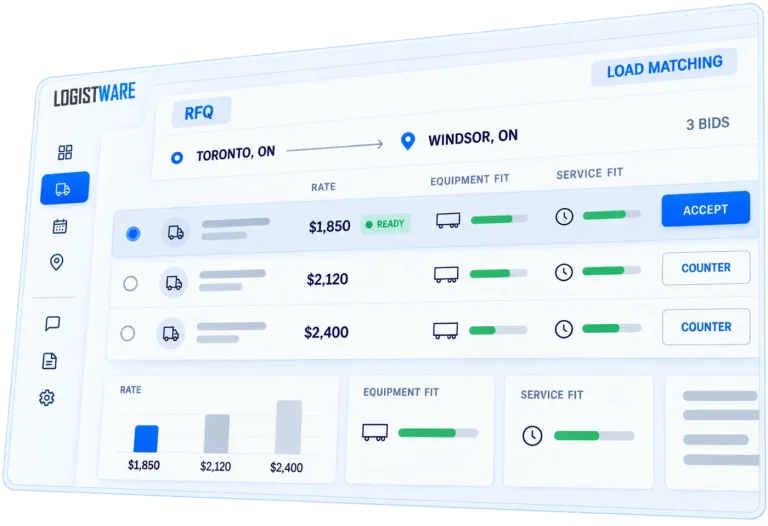
Carriers can post where their trucks are available and see shipments that match those lanes. After reviewing the load details, they can place a bid and negotiate with the shipper or broker until an offer is accepted and the shipment is awarded.
- Post truck availability by lane
- See shipments that match available trucks
- Place bids and respond to counteroffers
Real-Time Freight Tracking
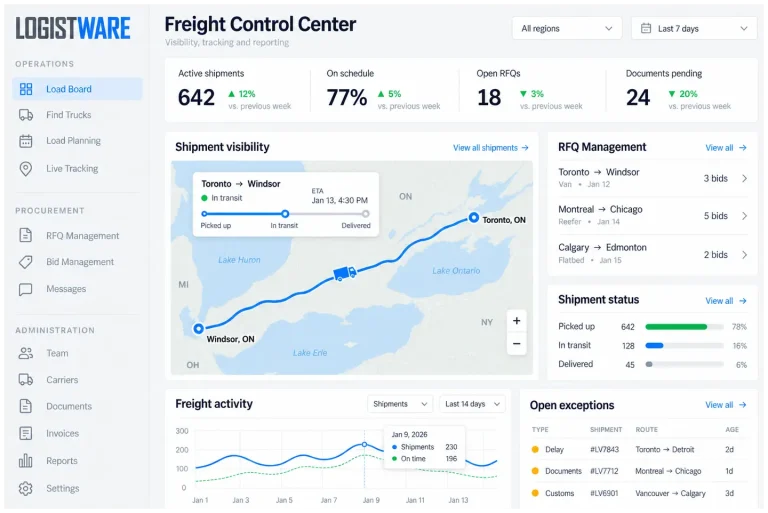
Once a load is awarded and assigned, shippers can follow the shipment as it moves from pickup to delivery. Live tracking keeps the current location and shipment progress available without relying on repeated calls for status updates.
- Follow active shipments in real time
- See progress from pickup through delivery
- Keep shipment location tied to the load
Live Freight Chat
Keep conversations connected to the shipment instead of scattering updates across calls, texts and separate messages. Shippers, brokers and carriers can discuss the load directly, while drivers can stay in contact with their dispatcher from the mobile app.
- Chat about bids and active shipments
- Keep pickup and delivery details in one place
- Let drivers communicate with dispatch from the app
Digital Freight Document Exchange
Keep shipment paperwork with the load and make documents available to the people who need them. Drivers can use the Logistware mobile app to upload BOLs, proof of delivery, photos and other shipment files directly from their phone.
- Upload BOLs and proof of delivery from a phone
- Share shipment documents and images online
- Keep files organized with the correct load
Freight Team & Dispatch Management
Build the team around each account and shipment. Shippers can add dispatchers, while carriers can add dispatchers and drivers, organize drivers under dispatchers, and assign an awarded load to the right driver for pickup and delivery.
- Add dispatchers to shipper accounts
- Manage carrier dispatchers and drivers
- Assign awarded shipments to the right driver
Carrier & User Vetting
Logistware supports more accountable freight connections by reviewing submitted profile information along with applicable authority and compliance documentation provided during the registration and vetting process.
- Manual review of submitted profiles
- Review of applicable authority information
- Review of submitted compliance documents
How the Logistware Canadian Load Board Works From Load to Delivery
The Logistware Canadian load board connects each stage of a shipment, from posting and route-based matching to carrier bidding, driver assignment, live tracking, document exchange and delivery. Shippers and freight brokers post shipments, carriers find matching loads and place bids, and teams stay connected as the load moves.
-
01↗
Post Shipments & Truck Availability
Shippers and brokers can post freight in Canada, while carriers set where their trucks are available and can find truck loads in Canada that match those lanes.
-
02⇄
Match Trucks & Loads by Route
AI-assisted shipment tools help analyze the route and surface relevant trucks already available along the lane, helping shippers find trucks for freight while carriers see shipments near their posted availability.
-
03✓
Bid, Counter & Award the Load
Carriers place bids on shipments they want to move. Shippers and brokers can accept, reject or counter an offer, and both sides can continue negotiating until a bid is accepted and the load is awarded.
-
04◇
Assign Drivers & Stay Connected
Carrier teams can use team and dispatch management to assign the awarded load to the right driver. Shippers, carriers, dispatchers and drivers can stay connected with live freight chat.
-
05◎
Track & Exchange Documents
Shippers can follow the load with real-time freight tracking. Drivers can upload BOLs, photos and other shipment files from their phone, while users keep records together through digital document exchange.
-
06●
Complete Delivery & Proof
After delivery, the driver can upload proof of delivery and final shipment images or documents from the Logistware app, giving the shipper and carrier a clear record of the completed load.
Canadian Load Board for Shippers and Carriers
Logistware connects shipment posting and truck availability through one Canadian load board. Shippers and freight brokers can post shipments with AI-assisted lane insights and see carriers already positioned along the route. Carriers can post where their trucks are available, find matching shipments and bid directly on the freight.
Load Board for Shippers
I have freight to movePost a shipment with AI-assisted route guidance, review carriers already moving along the lane and compare incoming bids. Accept, reject or counter offers until you award the load, then keep your dispatchers connected with live chat, documents and shipment tracking.
Read More About the Shipper Load Board
- Post Freight in Canada Create shipment postings with AI-assisted lane guidance that helps you review the route, plan the move and identify useful cost-saving considerations before publishing.
- Find Trucks for Freight See carriers and trucks already available along the shipment route so you can focus on transportation providers positioned for that lane.
- Find Freight Carriers Review carrier interest and bids on your shipment, then accept, reject or counter offers until the price and terms are agreed and the load is awarded.
- Track Freight in Real Time Follow the awarded shipment from pickup to delivery while keeping live chat, BOLs, PODs, images and other shipment documents connected to the load.
Truck Load Board for Carriers
I have trucks and need freightPost where your trucks are available and Logistware can surface shipments moving through those locations and lanes. Bid on the freight, negotiate offers, then use carrier team management to organize dispatchers and drivers and assign the awarded shipment to the right driver.
Read More About the Carrier Load Board- Find Truck Loads in Canada Post your truck availability between locations and see shipments that match where your equipment is already running or where you want to move next.
- Local & Short-Haul Loads Match available trucks with nearby shipment opportunities and bid on local or regional freight that fits your timing and preferred area.
- Cross-Border Freight Find Canada–U.S. shipments that line up with your posted truck availability and the cross-border lanes your drivers are prepared to service.
- Real-Time Freight Tracking After a load is awarded, dispatch can assign the driver, the driver receives it in the mobile app, and the team can chat and upload BOLs, PODs, images and delivery documents from the road.
Canadian Load Board
Tools for Brokers,
Owner-Operators
& Dispatchers
Logistware is a Canadian load board where shippers and freight brokers post shipments and carriers bid on those shipments. As loads move, users can stay connected with live chat, live tracking, document exchange, and instant document uploads from a driver’s phone through the Logistware app.
Load Board for Freight Brokers
Freight brokers can post shipments to the Logistware load board, receive bids from carriers, communicate through live chat, exchange documents, and follow active loads with live tracking.
Explore Broker Posting & Bidding ToolsTruck Load Board for Owner-Operators
Owner-operators can browse posted shipments, bid on loads that fit their truck and preferred lanes, use live chat, follow live tracking, exchange documents, and upload documents through the Logistware mobile app.
Explore Loads & Start BiddingLoad Board Tools for Dispatchers & Transportation Teams
Dispatchers and transportation teams can keep drivers connected to active loads, communicate through live chat, follow live tracking, exchange documents, and have drivers upload documents instantly from their phones using the Logistware app.
Explore Dispatch & Load Tracking Tools
A Canadian load board for enterprise shippers displayed on a large digital billboard surrounded by major Canadian transportation routes, including Highway 401, Highway 400, Highway 404, Highway 427, QEW, and the Trans-Canada Highway. The image represents a modern digital freight platform for posting loads, booking shipments, comparing freight rates, and managing transportation across Canada.
See the Logistware Load Board in Action
See how the Logistware load board connects freight discovery, shipment posting and transportation visibility for carriers, shippers and freight brokers.
Find Truck Loads Across North America by Equipment Type
Carriers can post where their trucks are available and use the Logistware load board to see shipments that match those lanes and equipment types. Route-aware matching helps narrow the search across Canada, the United States and cross-border freight so you spend less time sorting through loads that do not fit your truck.
Why Choose Logistware's AI Freight Load Board Smarter Technology. Straightforward Pricing. More Built In.
Logistware gives shippers, brokers, carriers, dispatchers and drivers modern freight tools without the cost structure and dated experience associated with many legacy load boards. AI-assisted shipment entry and matching work alongside bidding, live tracking, live chat, freight documents and team tools so more of the load can be managed in one load board from posting through delivery.
AI Freight Intelligence
Create shipment details from uploaded PDFs or EDI Advanced Ship Notice documents and use AI-assisted tools to reduce manual entry, identify relevant lanes and surface trucks or loads that better match the freight.
Straightforward Load Board Pricing
Get modern load-board technology with clear subscription pricing instead of a legacy pricing model built around expensive add-ons. Logistware is designed to make powerful freight tools accessible without turning every useful feature into another separate purchase.
No Contracts. No Hidden Fees.
Use Logistware without a long-term contract or surprise fees. Membership can be cancelled from your account, giving carriers and shippers the flexibility to stay because the load board works for them—not because they are locked in.
Tracking, Chat & Documents Built In
Follow active freight with live tracking, communicate directly through live chat and keep BOLs, PODs, photos and other shipment documents with the load instead of chasing updates across phone calls, emails and separate systems.
Teams, Dispatchers & Drivers
Shippers can add dispatchers, while carriers can add dispatchers and drivers, organize driver assignments and send awarded loads to the right driver. The mobile app keeps notifications, chat and document uploads close to the people moving the freight.
North American Freight in One Load Board
Post shipments, find matching truck availability, bid and counter offers, award loads and continue through dispatch and delivery across Canada, the United States and cross-border freight lanes without switching between disconnected freight tools.
Custom Portals Built Around Your Business
Larger shippers and carriers do not always work the same way. Upon request, Logistware can create a tailored portal around specific freight, team and account needs so partners can give their users a more customized load-board experience without giving up the core Logistware technology behind it.
Questions About the Logistware Canadian Load Board
Learn how the Logistware load board helps shippers and freight brokers post shipments, carriers find and bid on loads, dispatch teams assign drivers, and everyone stay connected with AI tools, live tracking, live chat and freight document exchange across Canada, the United States and cross-border lanes.
Canadian Load Board Basics
What is a Canadian load board?
A Canadian load board helps shippers and freight brokers post shipments while carriers search for freight that matches their trucks, equipment and preferred lanes.
In Logistware, carriers can also post truck availability, review matching shipments, place bids and negotiate through counteroffers until a load is awarded. The same load can then stay connected to dispatch, tracking, chat and documents through delivery.
Explore the Logistware truck load boardCan carriers find truck loads in Canada with Logistware?
Yes. Carriers and owner-operators can search available truck loads in Canada and also review U.S. and cross-border freight opportunities that fit their equipment and preferred routes.
Carriers can post where their trucks are available so Logistware can surface shipments moving through those lanes, helping them spend less time sorting through freight that does not fit their truck.
Find truck loads in CanadaShipment Posting, Bidding & Cross-Border Freight
Can shippers and freight brokers post shipments and receive carrier bids?
Yes. Shippers and freight brokers can post shipments to the Logistware load board and receive bids from carriers interested in moving the freight.
They can accept, reject or counter a bid until both sides agree. Logistware also includes AI-assisted shipment entry that can help create shipment details from uploaded freight documents such as PDFs and EDI Advanced Ship Notice files, reducing repetitive manual entry.
Learn how to post freightDoes Logistware support Canada–U.S. cross-border freight?
Yes. Logistware supports freight moving across Canada, the United States and Canada–U.S. cross-border lanes. Users can post or find loads, communicate through live chat, exchange shipment documents and follow awarded freight with live tracking.
Customs, authority and regulatory requirements remain the responsibility of the appropriate parties involved in each shipment.
Explore Canada–U.S. cross-border freightAI Load Board & Equipment Types
Is Logistware an AI-powered load board?
Yes. AI is built into Logistware to reduce repetitive freight work and help users act on shipment information faster.
AI-assisted tools can help turn uploaded documents such as PDFs or EDI Advanced Ship Notice files into shipment details, while route-aware tools help surface trucks and loads that line up with the same lane. Additional AI tools support shippers, carriers, dispatchers and drivers throughout the load-board process.
What truck and equipment types can carriers find loads for?
Logistware supports all truck and equipment types. The dedicated equipment pages highlight common examples so carriers can read more about freight suited to those truck types.
Examples include dry van, reefer, flatbed, hot shot, Sprinter van, LTL freight and heavy haul.
Team Management & Account Review
How does team management work for shippers and carriers?
Shipper accounts can add dispatchers to help manage shipment activity. Carrier accounts can add dispatchers and drivers, organize drivers under dispatchers and assign awarded shipments to the appropriate driver.
Drivers can receive assignment notifications in the Logistware mobile app, communicate with dispatch and upload shipment photos, BOLs, proof of delivery and other documents directly from their phones.
Explore team managementHow does Logistware review users before load board access?
Registration can include submitted profile information and applicable authority or compliance documentation. That information is reviewed before access is approved where review is required.
The goal is to give shippers, brokers and carriers more useful information about the businesses they may choose to work with inside the Logistware load board.
Learn more about the Logistware vetting process